Photo Collage Mistakes: 10 Common Errors That Ruin Your Canvas Collage (and How to Fix Them)
Creating a visually balanced photo collage on canvas can completely transform a space, but many people unknowingly make design and preparation mistakes that reduce the final print quality. If you are planning to design a custom wall display, a well-structured canvas collage can turn your memories into a professional-looking artwork—but only if the common pitfalls are avoided.
This guide breaks down the most frequent photo collage mistakes, explains why they happen, and provides practical solutions so your final canvas print looks intentional, sharp, and visually cohesive.
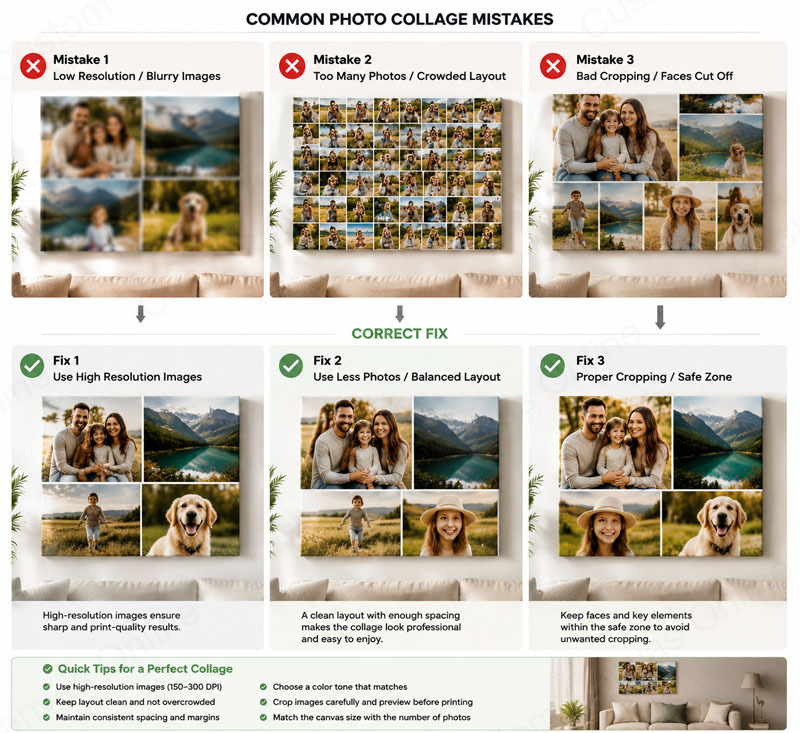
1. Using Low-Resolution Images
One of the most critical mistakes is uploading images that are too small or compressed. Many users choose photos from social media or messaging apps, which heavily reduce resolution.
Why it matters:
When stretched across a canvas, low-resolution images become pixelated and blurry, especially for larger prints.
How to fix it:
- Use original camera files whenever possible
- Ensure images are at least 150–300 DPI for printing
- Avoid screenshots or heavily compressed images
High-resolution inputs are the foundation of a professional collage canvas.
2. Overcrowding the Layout
Many users try to include too many photos in one collage. While it may feel like you’re capturing more memories, overcrowding reduces visual clarity.
Problem:
Too many images compete for attention, making the design feel chaotic.
Solution:
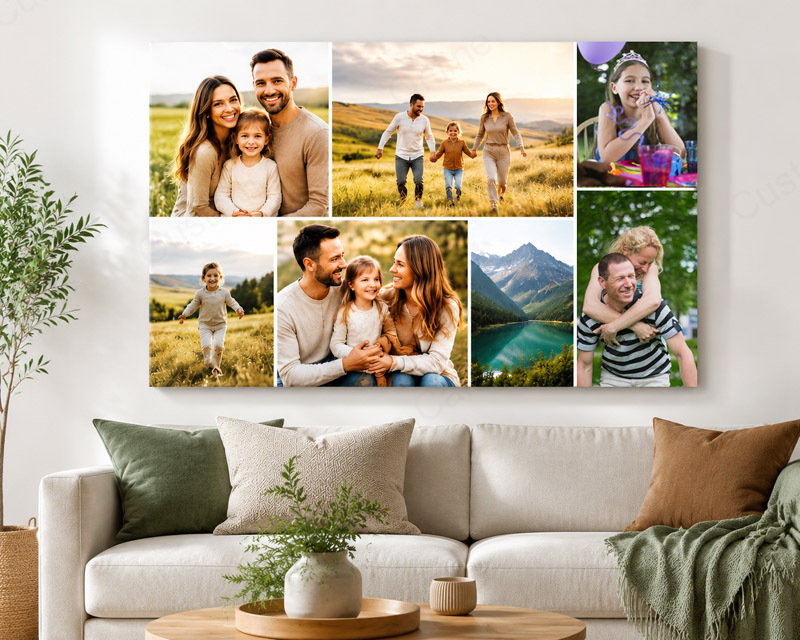
- Stick to 3–6 strong focal images for medium canvases
- Use fewer images for larger emotional impact
- Leave breathing space between photos
A clean layout often looks more premium than a dense one.
3. Ignoring Aspect Ratio Differences
Mixing portrait, landscape, and square images without adjustment can create uneven cropping or awkward spacing.
What goes wrong:
Important parts of images may get cut off during automatic cropping.
Best practice:
- Pre-crop images before uploading
- Align photos with consistent orientation when possible
- Preview crop zones carefully before finalizing
Consistency in aspect ratio improves visual harmony.
4. Poor Image Selection (No Theme or Story)
A collage without a clear theme often feels disconnected. This is a common issue when users randomly select images.
Impact:
The final canvas lacks emotional or visual coherence.
Fix:
- Choose a theme: travel, family, wedding, pets, milestones
- Group images by color tone or mood
- Tell a visual story from left to right or top to bottom
A strong narrative improves the emotional value of the canvas.
5. Weak Color Balance
Color inconsistency is often overlooked. Bright, dark, warm, and cool images mixed together can create visual tension.
Why it matters:
The human eye prefers harmony; inconsistent tones can feel cluttered.
Solution:
- Apply subtle filters to unify tone
- Convert some images to black and white for balance
- Avoid mixing heavily saturated and muted images without planning
Color harmony elevates the overall aesthetic quality.
6. Incorrect Spacing and Margins
Spacing errors can make a collage look either too tight or disconnected.
Common issues:
- Images touching each other with no margin
- Uneven spacing between photos
- Misaligned grid structure
How to improve:
- Use a grid-based layout
- Maintain consistent margins between images
- Align edges precisely before printing
Proper spacing creates a professional design structure.
7. Choosing the Wrong Canvas Size
Many users select a canvas size before considering image quantity or resolution.
Problem:
A small canvas with many images becomes cluttered, while a large canvas with too few images looks empty.
Guideline:
- Small canvas: 2–4 images
- Medium canvas: 4–7 images
- Large canvas: 6–12 images depending on layout style
Always match size with content density.
8. Ignoring Focal Hierarchy
Not all images should have equal importance. A common mistake is treating every photo the same visually.
Result:
The viewer’s eye has no natural starting point.
Improvement strategy:
- Use a larger central image as the focal point
- Reduce size for secondary images
- Arrange images to guide visual flow
Hierarchy creates intentional design rather than randomness.
9. Forgetting Print Bleed and Cropping Safety
Digital previews often don’t reflect real print trimming.
Risk:
Important parts of faces or objects may be cut off during canvas wrapping.
Solution:
- Keep key elements away from edges
- Use safe margins provided in design tools
- Preview “wrap edges” before final confirmation
This step prevents costly printing errors.
10. Over-Relying on Automatic Layout Tools
Automatic collage generators are convenient but often produce generic results.
Downside:
Layouts may lack balance or emotional design intent.
Better approach:
- Start with a template, then manually adjust
- Fine-tune spacing, alignment, and image order
- Review composition before final export
Manual refinement is what separates average collages from premium wall art.
How to Create a High-Quality Canvas Collage
To achieve a professional result, combine technical preparation with design thinking:
- Use high-resolution images only
- Choose a clear visual theme
- Maintain consistent spacing and alignment
- Balance colors and image tones
- Match canvas size with image quantity
- Preview cropping and edges carefully
Platforms such as Custom Canvas Online provide structured tools that help users avoid these mistakes while producing gallery-quality results.
A canvas collage is more than just a collection of photos—it is a designed visual story. Most mistakes happen not because of lack of creativity, but because of overlooked technical and compositional details.
By avoiding the common errors above, you ensure your collage is not just visually appealing on screen, but also professionally printed and display-ready on your wall. Thoughtful planning, consistent design choices, and attention to detail are what ultimately transform a simple photo set into a meaningful piece of wall art.
Recent Posts
-
Large Dog Canvas Prints for Living Rooms: Design Tips That Work
Dogs are more than pets. They are family members, loyal companions, and part of many of our happiest …16th Sep 2026 -
Why Large Canvas Prints from Digital Photos Make Perfect Personalized Gifts
Finding a gift that feels truly personal can be challenging. Many traditional gifts are useful for a …28th Aug 2026 -
Why Floating Frame Canvas Prints Are Ideal for Showcasing Photographs
Photographs capture the moments, people, and experiences that matter most to us. Whether it is a fam …25th Aug 2026