

Description
Your photos, beautifully framed
Photo printing and framing, made personal.
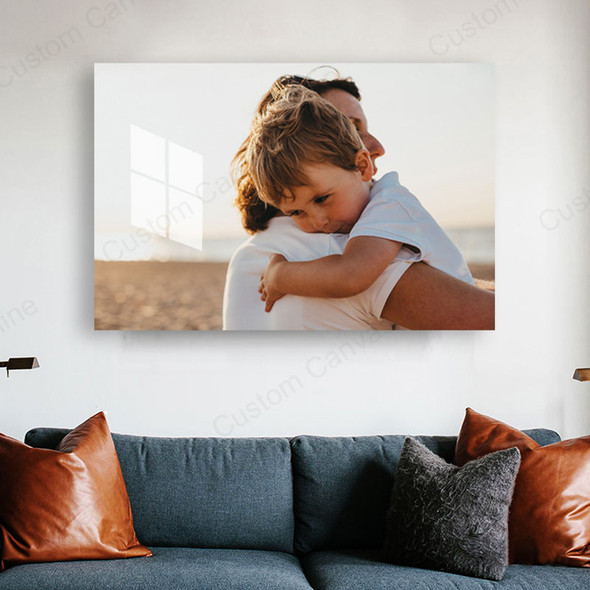
Turn a favourite photograph into something you can enjoy every day. Our framed photo prints pair your image on natural white, matt fine art paper with a wood-veneered timber frame. Choose from six frame finishes, create your layout in the online editor and decide whether to add a separate white matboard.
From a family portrait to a favourite landscape or your own artwork, choose a finish that suits both the image and the room.
- Fine art paper included210gsm, acid-free, natural white and matt.
- Six frame finishesWhite, Black and four wood tones.
- 20 × 30 mm profile20 mm front face; 30 mm front-to-back depth.
- Optional white matboardA separate card mount that increases the finished size.
A separate finishing touch
Matboard (White Card Mount): an optional physical surround.
White Matboard is a separate white card mount with a cut-out window, fitted around your printed artwork during framing. It is added outside your selected print size, making the finished framed piece larger.
It is not an unprinted margin on your photo paper or a border effect created in the editor. Choose No Matboard or Add White Matboard under Matboard (White Card Mount) in the product options.
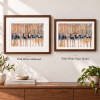
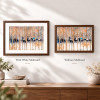
The diagrams show the same print area with and without an added card mount. They are illustrations, rather than exact border widths or finished measurements. Natural white paper and white matboard may differ in tone.
Adding White Matboard makes the finished piece larger.
50 cm x 70 cm print → approximately 62 cm x 82 cm overall with matboard
The card mount is added around the selected print size, rather than reducing the print to fit inside the same outer frame. The example above is an approximate finished outer measurement, including the frame. Contact us before ordering if the piece needs to fit a specific space.
| Choice | Where you choose it | What it does |
|---|---|---|
| Artwork Style | Online editor | Choose Full Bleed, Mat Border or another available layout. These change the design on the paper and do not automatically add a physical card mount. |
| No Matboard | Matboard (White Card Mount) product option | The print is framed without a separate card mount. Editor borders may still be part of the print layout. |
| Add White Matboard | Matboard (White Card Mount) product option | A separate white card mount is added outside the selected print size, increasing the finished outer dimensions. |
Already adding a border in the editor? If you also choose Add White Matboard, both surrounds will appear: the border within your printed design and the separate card mount around the print.
Six finishes, one personal choice
Find a frame colour for your photograph and your home.
Look for a finish that picks up a tone in the image or works with nearby furniture. Use one colour across a gallery wall for a consistent look, or give a favourite photograph its own contrasting surround.

The detail photograph shows the six frame finishes and the 20 mm front face × 30 mm depth profile. Light Oak Finish and Walnut Finish are finish names, rather than claims about the timber species. Screen settings and room lighting affect colour appearance.
A considered standard
210gsm matt fine art paper, included with every print.
Every framed photo print uses Matte Etching Fine Art Paper (210gsm). Made from 100% alpha-cellulose, the paper is acid-free and has a natural white tone with a matt surface, rather than a glossy photo-paper finish.
We keep the paper consistent, so you can focus on choosing your size, frame colour and design. If you choose Mat Border in the editor, the natural white surround is an unprinted part of the same sheet. It stays within the selected print size and does not add a separate physical matboard.
Want an unframed print with a choice of paper types? Explore our Giclée Prints.
Know your frame
A timber frame with a wood veneer finish.
A thin layer of wood veneer covers the timber frame’s exterior to create its finished surface. Choose the finish for its appearance, with the same frame profile across all six colours.
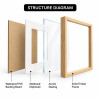
The moulding measures 20 mm across the front face and 30 mm deep from front to back. Face width describes the border of the frame itself; depth describes how far the moulding extends from front to back.
| 20 mm | 30 mm |
|
|
|
| Front face width | Side depth |
Frame-profile measurements. These do not specify the print size or finished outer frame dimensions.
| What you receive | Your image printed on paper and fitted in the selected frame. |
|---|---|
| Standard paper | Matte Etching Fine Art Paper (210gsm), included. |
| Paper composition | 100% alpha-cellulose. |
| Paper surface and tone | Matt finish; natural white; acid-free. |
| Frame construction | Timber frame with a wood veneer finish. |
| Frame profile | 20 mm front face width × 30 mm front-to-back depth. |
| Frame colours | White, Light Oak Finish, Natural Wood Finish, Warm Brown Finish, Walnut Finish and Black. |
| Matboard (White Card Mount) | No Matboard or Add White Matboard. Adding the separate white card mount increases the finished outer dimensions. |
| Artwork Style in the editor | Full Bleed, Mat Border and other available design styles are chosen in the online editor. They do not automatically select physical matboard. |
| Size with added matboard | Example: a selected 50 cm x 70 cm print with Add White Matboard has an approximate finished outer size of 62 cm x 82 cm. |
Get the fit right
Choose a format that works with your image.
Start with your photograph’s proportions and the print size you want. Then allow for the frame and, if selected, the additional white matboard when planning the finished wall display.
Rectangle
A versatile choice for portraits, family photographs and landscapes. Choose an orientation and proportions that keep the subject comfortably in view.
Square
A balanced format for individual portraits and a consistent gallery wall. A rectangular original may need cropping to fit a square.
Panoramic
Consider a wide format for landscapes and travel images. Check the top and bottom edges so the crop keeps the details you want.
| Measurement | What it means | Why it matters |
|---|---|---|
| Selected print size | The size of the print, including any border or layout you create within the online editor. | An editor border is part of the print layout. It does not add a separate card mount outside the print. |
| Visible image area | The photograph or artwork visible within the design, frame opening and any matboard window. | Keep faces, lettering and signatures clear of the edges, printed borders and any matboard window. |
| Finished outer frame size | The outside width and height of the complete framed piece. Adding White Matboard makes this larger. | Use the finished outer measurement to plan wall space and the gaps in a gallery wall. |
Size example with Add White Matboard: a selected 50 cm x 70 cm print becomes approximately 62 cm x 82 cm overall when framed with the added mount.
The added card mount surrounds the selected print size. If the finished piece must fit an existing space or align with other frames, ask us to confirm its outer dimensions before you order.
Fitting a specific space or matching existing frames? Send us the required finished outer size, frame colour and your No Matboard or Add White Matboard preference before ordering.
From your file to your frame
How to create your framed photo print.
- 1
Choose your size, frame and matboard
Select your print size and frame colour, then choose No Matboard or Add White Matboard under Matboard (White Card Mount). Allow for a larger finished piece if adding the mount.
- 2
Upload and choose your Artwork Style
Upload your photograph or artwork, then choose Full Bleed, Mat Border or another available Artwork Style in the online editor. These design choices do not automatically select physical matboard.
- 3
Review your design
Use your best original file. Check the orientation, crop, border effects and positioning in the online preview, especially around faces, lettering and signatures.
- 4
Check your order
Check the print size, frame colour, matboard selection, total price and delivery details. Allow for the finished outer dimensions, including the additional space taken by White Matboard if selected.
A useful preview starts with a good file. Original photographs retain more detail than screenshots or compressed social-media copies. The editor preview helps you check the image layout. Check your physical matboard selection separately in the product options; the preview is not a physical colour, paper or finished-size proof.
Need the print for a particular date? Contact us with your size and Australian postcode before ordering to check the current production and delivery estimate.
Framed Photo Prints – Frequently Asked Questions
Everything you need to know about print layouts, physical matboard, finished sizes and ordering.
Make room for a favourite memory
A favourite photo. A finish that feels like you.
Choose your print size, frame colour and Matboard (White Card Mount) option, then create your image layout in the online editor. For help with your file or the finished outer size, contact us before ordering.
Ask about your framed printExplore all paper prints or choose unframed Giclée Prints.