




Description
Your Photo · Personalised Canvas Printing
Extra Large Canvas Prints Made from Your Photo
Turn a family portrait, a travel photograph or your own artwork into one large canvas. Choose the size and side finish, keep the details that matter in the composition, and preview your design before ordering.
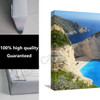
 Landscape canvas display example. Choose your own photo, size and orientation.
What Will You Receive?
Your photograph or artwork is printed on canvas using Epson 12-colour pigment inks. Choose how the print is supplied under Frame Thickness.
Stretched Canvas

Your print arrives stretched over an internal frame. Select 3.5CM or 4CM for a 3.5 cm or 4 cm side depth. The selected size describes the front width and height.
Rolled Canvas
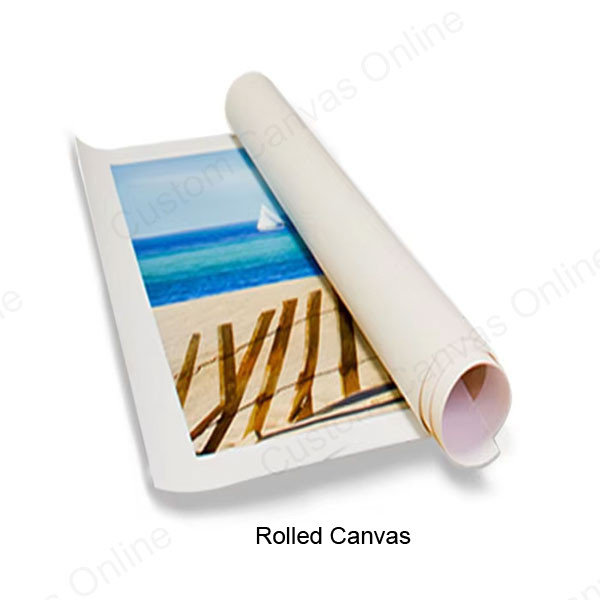
Select Rolled Canvas for an unstretched canvas print without an internal frame, for stretching or framing separately.
Choosing the Side Depth
The 4 cm option is 5 mm deeper than the 3.5 cm option. Both have the same front dimensions for your chosen size. Choose the side profile you prefer and compare the price shown for each option.
A decorative floating outer frame is a separate product choice. View Floating Frame Canvas Prints
See What Your Options Create
Example: a landscape canvas
This combination gives you a canvas 150 cm wide × 100 cm high, stretched over a 3.5 cm internal frame, with reflected image detail on the sides.
Use the same approach for your own order: establish the front dimensions, choose how the canvas is supplied, then select the side treatment.
Choose Your Size and Orientation
These are the 13 sizes available in this product’s Size menu. All measurements are in centimetres.
- 60 × 180 cm
- 80 × 160 cm
- 90 × 120 cm
- 90 × 180 cm
- 100 × 150 cm
- 100 × 200 cm
- 120 × 160 cm
- 120 × 180 cm
- 120 × 120 cm
- 125 × 250 cm
- 130 × 130 cm
- 140 × 140 cm
- 140 × 200 cm
Make your selection in the product options, where the current price is shown.
Need a different size? We also offer custom canvas sizes. If your preferred size is not listed, contact us with your required width and height in centimetres for a quote.
Portrait or Landscape?
The size labels list the shorter side first. Orientation determines which measurement becomes the width. For 100 × 150 cm in Portrait, the canvas is 100 cm wide × 150 cm high; the Landscape version is shown in the example above. Square sizes remain square.
Will Your Photo Work at This Size?
Check the shape of the photograph and the detail in the original file separately. A photo can fit the canvas shape and still need a smaller print size.
Match the Shape Before Cropping
A similar photo and canvas shape can retain more of your composition. These examples use sizes available on this product:
3:2 Photograph
Matches the proportions of 100 × 150 cm and 120 × 180 cm.
4:3 Photograph
Matches the proportions of 90 × 120 cm and 120 × 160 cm.
These examples compare proportions only. They do not confirm that a particular file will be sharp at the selected size.
If a wider canvas removes part of the top or bottom, reposition the photo or try a size closer to its original shape. Keep the people, landscape features or wording you want to show within the front image area.
Check the Detail You Want to Enlarge
- Use the original camera file or full-resolution download. Screenshots and copies saved from messaging apps may contain less detail.
- Look closely at faces, fine lettering and any joins in a panorama. If they are already blurred or broken up, try a better original or consider a smaller print.
- A tight crop leaves fewer pixels to fill the canvas. Judge the part you will keep, rather than the whole original photograph.
The online preview helps you assess placement and cropping. For advice on enlargement quality, send the original file and your preferred size before ordering.
Choose Your Canvas Wrap
For stretched canvas, choose how the sides should look after positioning the front image.
Mirror Wrap
Reflects the outer image edges onto the sides. Choose it for image-coloured sides while keeping your selected front composition. Check for repeated faces or recognisable objects at the folds.
Gallery Wrap
Continues the photograph around the sides. Works best when there is space around the subject that can extend beyond the front. Keep essential faces, wording and signatures clear of the folds.
Color Wrap
Uses solid-colour sides. Choose it for a plain finish without reflected objects or extended image patterns.
Stretch Wrap
Stretches the outer image colours and textures across the sides. Consider it for simple backgrounds; strong lines and recognisable details can look elongated.
Set the front crop before comparing wraps. Changing the side treatment cannot restore part of the photograph already removed by cropping.
Extra Large Canvas Questions
Create Your Extra Large Canvas
Choose your size, orientation, frame option and wrap, then open Upload Photos & Design. Position your photo and preview the crop. Review any colour effect or added text, your selected options and the current price before adding to your cart.
Need help choosing a size? Send the original image, the crop you want and your preferred dimensions for advice.


