Description
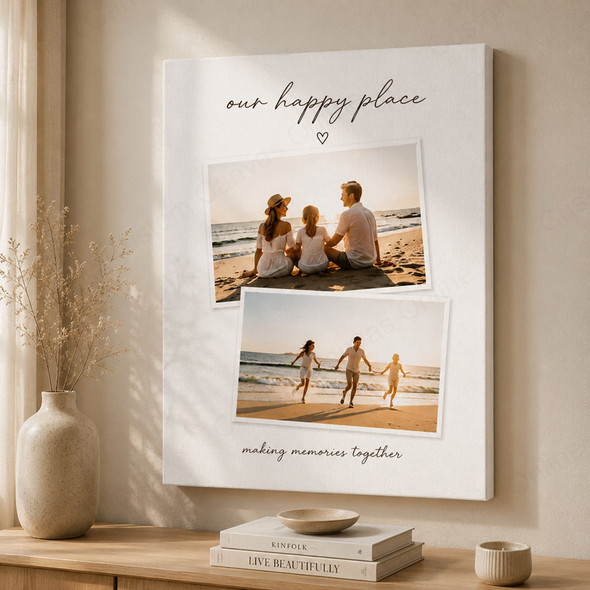
Two favourite photos. One canvas.
Create your 2 photo collage canvas print with a layout that brings both images together. Click Upload Photos & Design beneath the product title to choose a style, upload two photos and edit your design online. Preview the complete collage before adding it to your cart and checking out.
Pair a wedding portrait with a candid moment, two favourite family photos or a pet's younger and older portraits. Your photos become one personalised canvas artwork, with the arrangement you choose.
Your online 2 photo collage maker
Click Upload Photos & Design beneath the product title to open the online editor and create a photo canvas with 2 images. Choose a layout, upload both photos, edit and preview your design, then add your canvas to the cart and complete checkout.
Choose your size and style
Select a canvas size and compare the collage styles in the designer. Choose the arrangement that suits your two photos.
Upload both photos
Upload both original photos directly in the editor. Use the highest-resolution versions available so each photo has the best possible starting quality.
Adjust and preview
Reposition and resize the photos within the layout. Check the crop, balance and any text you add.
Add to Cart and order
Check the complete preview and your selected product options, then click Add to Cart and complete checkout to place your order.
Choose a layout for your 2 picture canvas print
Start with the subjects in your photos. A style looks best when each image has enough space for the details that matter. Compare the available style previews in the editor, then check how your own photos fit.
| Your photo pair | What to look for |
|---|---|
| Two portraits | Choose photo spaces that accommodate both subjects. Similar face sizes can make the pair feel balanced. |
| Two landscapes | Look for room to retain the main scenery. Keep horizons level and check what is cropped at each side. |
| One portrait and one landscape | Try the available styles with your actual photos. Choose the one that preserves both subjects without excessive zooming. |
| Then-and-now photos | Keep the sequence consistent and align the subjects at a similar scale so the comparison is easy to follow. |
For a cohesive collage on canvas, choose photos with a shared subject, similar lighting or complementary colours. They do not need to be identical, but both should feel like part of the same story.
Choose your canvas size with both photos in mind
The size you select is for the whole canvas. Each photo occupies part of that canvas according to your chosen style. Photo areas may not be equal, and spacing or text can reduce the space available for each image.
Measure your intended wall space, then select from the sizes shown in the product options. For close-up portraits, check the face size in the preview. For group photos or scenery, allow enough room for the smaller details you want to see.
Recheck after a change: Switching the canvas size, orientation or collage style can change the crop. Review both photos again before adding your finished design to the cart.
Check these details before you order
- Check each photo separately: One sharp photo cannot compensate for a blurry second image. Use original files rather than screenshots or compressed copies where possible.
- Keep important details clear of edges: Leave space around faces, heads and text, both at the outer canvas edge and where the two photo areas meet.
- Watch the crop: A photo may need cropping when its proportions differ from the space in the selected style. Reposition it to keep the main subject visible.
- Review the complete design: Check the photo order, alignment and spelling of any names or dates. Zoom into each image as well as viewing the whole collage.
The preview helps you assess composition. Final sharpness also depends on the original files, the crop and the printed size; screen brightness can affect how colours appear.
From your design to a canvas for your wall
One complete artwork
Your two photos are printed together on one textured canvas, stretched over a wooden frame and ready to hang.
Personalised printing since 2008
Custom Canvas Online brings experience in photo printing and canvas wall art to your personalised order.
Help with your photo choice
Unsure whether both files suit your intended size? Contact us before ordering for advice on quality and cropping.
Australia-wide delivery: AU$14.59 per order, with free delivery on orders over AU$99. Typical turnaround is approximately 5–7 working days, including delivery. Timing can vary with design requirements and delivery location; contact us before ordering if you need your canvas for a specific date.
2 Photo Collage Canvas Print FAQ
Answers to common questions about your photos, design and order.
Bring your two favourite photos together
Click Upload Photos & Design beneath the product title to choose a style, upload your two photos and edit your collage. Preview your finished design, then click Add to Cart and complete checkout to create a canvas that tells your story.