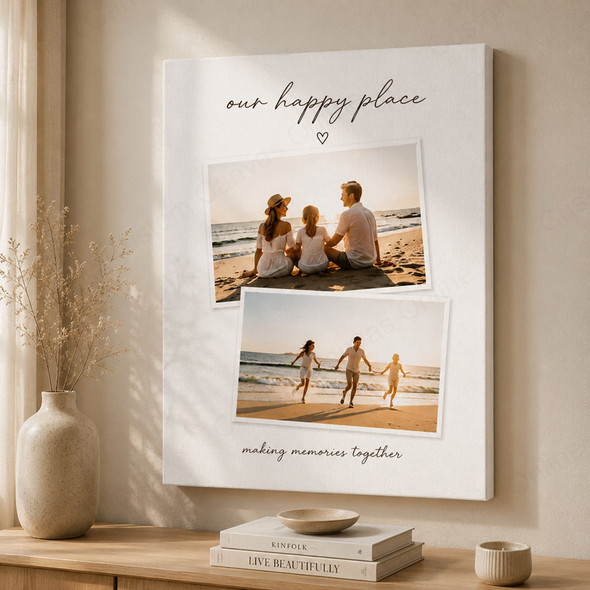
Description
Four favourite moments, beautifully brought together
Turn four images into a personalised 4 photo collage canvas print. Click Upload Photos & Design beneath the product title to explore the available designs, upload your four photos and edit them into one complete canvas artwork.
Create a family display with a place for each person, or bring the highlights of a wedding, birthday or holiday together. Choose a style that suits your photos and check the finished arrangement before ordering.
Create your four-photo canvas with the online designer
Begin with Upload Photos & Design beneath the product title to open the online editor. Choose a design, upload your four photos and adjust the arrangement. Preview the complete collage before clicking Add to Cart and completing checkout.
Open the online designer
Click Upload Photos & Design beneath the product title. Explore the available designs and check your selected canvas size and orientation.
Choose a design and upload
Select a design for four photos. Upload the original image files and check which photo works best in each space.
Edit your photo arrangement
Adjust positioning, scale and cropping with the editing tools. Review every image and any text you add.
Preview and order
Check all four photos in the complete preview and confirm your selected product options. When you are happy with the design, click Add to Cart and complete checkout to place your order.
Choose a design for your 4 picture collage canvas
Start with the photos you want to display, then compare how they fit the available designs. Pay attention to the shape and size of each photo area, particularly when combining portraits, group photos and scenery.
| Your photo selection | Design choice to consider |
|---|---|
| Four equally important photos | Look for similarly sized photo areas so each image receives comparable attention. |
| One favourite image and three details | If a design includes a larger photo area, use it for the main image and let the other three add context. |
| A mix of portraits and group photos | Give group photos enough room to preserve every person; tighter photo areas often suit individual close-ups. |
The design previews show the arrangements available to you. Try your own photos in a style and check all four crops before making your choice.
Create a family collage canvas with 4 photos
Four individual portraits can give family members their own space in one artwork. For a balanced display, use similar face sizes and leave a comparable amount of room above each head. Photos taken on different days can still work well together.
If your selection includes a family group photo, choose a photo area that keeps everyone visible. Combine it with individual portraits or candid moments to show both the family together and the personalities within it.
For a milestone gift: Four stages of a child growing up, four generations or four favourite family occasions can create a personal collection. A shared subject or colour palette helps the photos feel connected.
Create an event collage canvas with 4 images
Choose photos that show different parts of the occasion. This four-part approach can help you select a varied set for weddings, graduations, birthdays and celebrations.
Set the scene
Show the venue, setting or arrival so the viewer understands where the occasion took place.
Capture the key moment
Choose the moment that defines the occasion, such as a ceremony, speech, award or first dance.
Include the people
Add a group portrait or a natural interaction that captures the people and atmosphere.
Remember a detail
Finish the selection with a meaningful detail, such as a bouquet, cake, keepsake or celebration decoration.
Make the sequence easy to follow: Arrange the images in the reading order of your chosen design. If you select a two-by-two layout, left to right across the top row, then the bottom row, is a natural starting point.
Choose a canvas size that gives all four photos room
The size selected in the product options is the overall canvas size. Each photo occupies a portion of that canvas according to the chosen design. Photo areas may be different sizes, and borders, spacing or text can reduce the room available for images.
Check the smallest photo area when choosing your size. Faces in a group photo and small details may be difficult to see if the canvas is too compact. Measure your wall space and use the preview to judge which elements need more room.
Larger canvas, suitable files: A bigger print gives the composition more space, but it cannot restore detail missing from the original photos. If you are unsure, contact us with your intended size for advice.
Check every photo before ordering
- Review four original files: Use the clearest, highest-resolution versions available. Check each image separately; a sharp photo alongside a blurry one can make the difference more noticeable.
- Check the outside and inside edges: Keep faces, hands and text clear of the canvas edge and the boundaries between photo areas. Group photos need particular attention.
- Balance the visual weight: Compare face sizes, brightness and colours across the four images. Keep a consistent emphasis when every photo is equally important.
- Inspect text and small details: Check names, dates and spelling. Make sure the wording remains readable and does not cover important parts of a photo.
- Recheck after editing: Changing the design, canvas size or orientation can change the crops. Review all four images again before adding your finished design to the cart.
View the full composition and zoom in to inspect individual photos. The preview helps with layout decisions; final sharpness depends on the original files, cropping and print size. Screen brightness and colour settings can also affect the appearance of the preview.
Personalised collage canvas prints for your home or a gift
One finished canvas artwork
Your four photos are printed together on textured canvas, stretched over a wooden frame and supplied ready to hang.
Photo printing experience since 2008
Custom Canvas Online has experience producing personalised prints and canvas wall art, with advice available before you order.
Help choosing your images
If one file is softer than the others or a group photo is hard to fit, contact us for advice on your photos, design and intended size.
Australia-wide delivery: AU$14.59 per order, with free delivery on orders over AU$99. Typical turnaround is approximately 5–7 working days, including delivery. Timing can vary with design requirements and delivery location; contact us before ordering if your canvas is needed for a specific date.
4 Photo Collage Canvas Print FAQ
Answers about four-photo designs, family and event layouts, image quality and ordering.
Give your four favourite photos a place together
Choose your canvas options and click Upload Photos & Design beneath the product title to choose a design, upload your four photos and edit your collage. Preview the finished artwork, then click Add to Cart and complete checkout.